TransferProButton

© 转载需要保留原始链接,未经明确许可,禁止商业使用。支持原创 CC BY-NC-SA 4.0
危险
✂️ 当前组件已停止更新维护,该文档已归档并停止更新。
基于 TransferPro 实现,将 Modal.open 操作内置到组件中,渲染为 Button 组件。
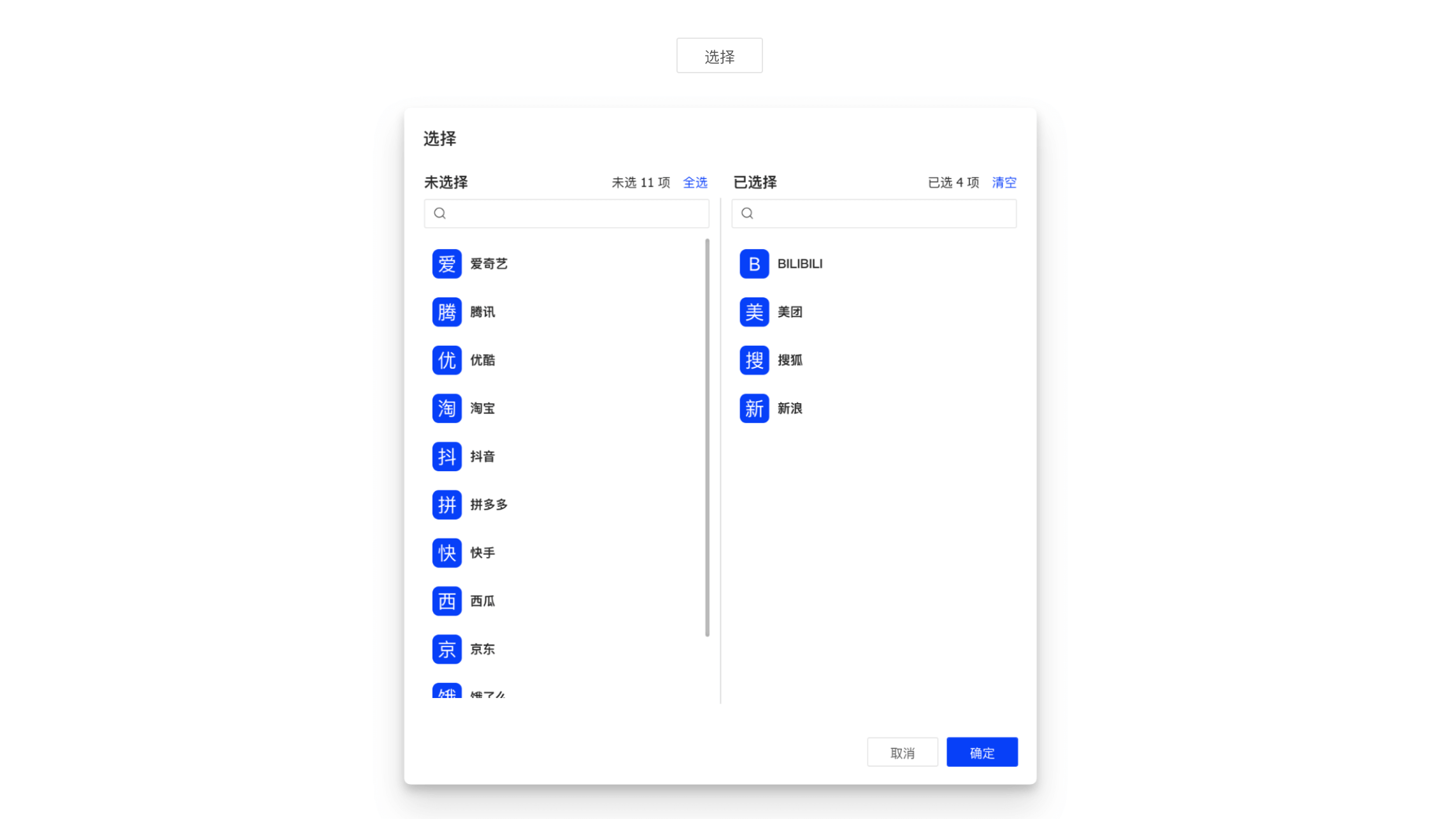
特性说明
- 支持
TransferPro所有特性 - 内建弹窗支持
基本用法
import { TransferProButton } from 'hscs-common/components';

export default () => {
  const handleAssign = async ({ originalData, initialData, value, created, deleted }) => {
    console.log(originalData, initialData, value, created, deleted);
    // call save api
  };

  return (
    <TransferProButton
      buttonProps={{
        funcType: FuncType.link,
        disabled: true,
      }}
      modalProps={{
        onOk: handleAssign,
      }}
      titles={['未分配租户', '已分配租户']}
      configProps={{
        primaryKey: 'tenantId',
        textField: 'tenantName',
        valueField: 'tenantNum',
        lovCode: 'HPFM.TENANT_PAGING',
      }}
      targetProps={{
        primaryKey: 'assignTenantId',
        read: ({ data }) => {
          return {
            url: `${API_PREFIX}/model-assigns`,
            method: 'GET',
            data: { ...data, modelId: record?.get('modelId') },
          };
        },
      }}
    >
      分配
    </TransferProButton>
  );
};
API
| 参数 | 类型 | 说明 | 默认值 |
|---|---|---|---|
| buttonProps | ButtonProps | 可选 按钮属性,默认 onClick 是打开弹窗,如果传入 onClick 事件,会先执行 | - |
| modalProps | TModalProps | 可选 基于弹窗属性 ModalProps,key children 除外,onOk 事件回调中会注入参数,详细 | - |
| 其他 | TransferProProps | 支持 TransferProProps 所有属性,详见 TransferProProps | - |
ButtonProps.onClick
组件默认的 onClick 事件会打开弹窗,如果同时指定了 onClick 事件回调 (异步),则会先执行。
TModalProps.onOk
onOk 回调中会注入以下参数:
| 参数 | 类型 | 说明 |
|---|---|---|
| originalData | unknown[] | 原始数据,目标数据源接口的返回数据 |
| initialData | unknown[] | 初始化数据,由 originalData 与源数据匹配之后的数据 |
| value | unknown[] | 当前已选择的所有值 |
| created | unknown[] | value 与 initialData 对比,新增的数据 |
| deleted | unknown[] | value 与 initialData 对比,删除的数据 |
源代码
TransferProButton/index.tsx
import { Button, Modal } from 'choerodon-ui/pro';
import type { ButtonProps } from 'choerodon-ui/pro/lib/button/Button';
import type { ModalProps } from 'choerodon-ui/pro/lib/modal/Modal';
import { isFunction } from 'lodash';
import { useObserver } from 'mobx-react-lite';
import * as React from 'react';
import type { TransferProProps } from '.';
import TransferPro from '.';

export interface TButtonModalProps extends Omit<ModalProps, 'key' | 'children' | 'onOk'> {
  onOk: (args: any) => boolean | void | Promise<boolean | undefined> | undefined;
}

export type TransferProButtonProps = {
  /** @description 按钮属性 */
  buttonProps?: ButtonProps;

  /** @description 弹窗属性 */
  modalProps?: TButtonModalProps;
} & TransferProProps;

const modalKey = Modal.key();

/**
 * @see https://changnian.netlify.app/docs/c7n/custom-components/transfer-pro-button
 */
const TransferProButton: React.FC<TransferProButtonProps> = ({
  buttonProps = {},
  modalProps = {},
  children,
  configProps,
  targetProps,
  avatarProps,
  titles,
  className,
  style,
  searchable,
  onChange,
  renderItem,
}) => {
  const handleOpen = async (event) => {
    const { onClick } = buttonProps;
    if (isFunction(onClick)) {
      // 默认的按钮时间会被提前执行
      await onClick(event);
    }

    const transferProps = {
      configProps,
      targetProps,
      avatarProps,
      titles,
      style,
      className,
      searchable,
      onChange,
      renderItem,
    };

    Modal.open({
      title: '选择',
      style: { width: 600 },
      ...modalProps,
      key: modalKey,
      maskClosable: false,
      children: <TransferPro {...transferProps} />,
    });
  };

  return useObserver(() => (
    <Button {...buttonProps} onClick={handleOpen}>
      {children}
    </Button>
  ));
};

export default TransferProButton;
Q & A
1. 怎么理解 originalData 与 initialData
示例:现在存在两个实体教师 (Teacher) 和教室 (ClassRoom),两者之间存在多对多的关系。
// 实例
teacher1 = { tid: 't01', tName: 'Sir' };
teacher2 = { tid: 't02', tName: 'Madam' };
classRoom = { cid: 'c01', tName: 'Class A' };

// 假设存在这样一条匹配关系
relation = { tid: 't01', cid: 'c01' };
在为教室分配教师的情况下,穿梭框的数据就是教师,configProps 的配置用来加载所有教师数据,targetProps 配置用来加载已匹配的关系数据。
originalData 就是这里的匹配关系原始数据;initialData 就是用 originalData 中的主键 tid 去匹配所有教师,将已包含的教师数据作为穿梭框【已选数据】,剩余部分作为穿梭框【源数据】
更新日志
0.1.1
- 🎉
hscs-front-common@0.1.1起支持该组件